Interviewed!
How cool to get interviewed! Laurie Hansen contacted me for an interview about our WA STEM grant project. It was such a cool experience.
Check it out at her blog, Vicariosity.
Thanks again, Laurie!
Innovation, Passion, Engagement
It all started when I read on Twitter about Dan Pink’s Fedex Day post for fostering innovation. This sparked something in many educators. Josh Stumpenhorst initiated an innovation day at his school after another teacher, Matt Langes, tried it. Josh’s innovation day even hit the news and Dan Pink himself contacted Josh!
The idea of a Fedex Day or an Innovation Day appealed to me for several reasons. Some of the things classroom teachers struggle with is providing their students with a well-rounded education, exposing them to new things, while dealing with dis-engaged, bored students who hate school. I’ve pondered such problems on this blog such as student boredom, comparing a totally traditional education to a totally free education, thinking through what is on-task, and tried to see how much socializing teachers can put up with.
I’ve been toying with how I could do such a thing with my students to help them enjoy their public school education and get something out of it. For some reason unbeknownst to me, not all my students enjoy or are fully engaged in the wonderful Science topics that we are studying! And I’m not kidding, the Science topics we study, really any Science topics, are fun to learn about so why not give it a shot and learn something?? So unless I can convince all the other teachers in my grade levels (6th and 8th) to do an innovation day (well, I could try that but usually try things on my own first), I needed something different. As if to offer me just that I start reading on Twitter about 20%. Instead of having just one day for innovation some teachers, following the lead of places like Google, will give students 20% of their time to work on whatever they want!
I read Paul Bogush’s blog on 20% and began to think of what I’ve been brewing. What follows here are my comments to Paul’s blog:
I have been struggling with doing this exact same thing with my five Science classes. I am close, this week or next, to actually introducing this idea to my students. I like your idea because I was going to go so far as to let them work on anything they want even if it’s not Science. Maybe that’s why I’ve been so hesitant. How can I defend giving up 20% of Science instruction when my 8th graders have a state Science test this year? One reason I’ve even considered doing this has been that I still have disengaged kids in my classes. And others that I have to encourage daily to work and learn. And this after I have gone gradeless AND offer them choice in being able to go off on tangents and in how they demonstrate learning. Having iPads and iMacs can be more of a distraction from Science learning than a tool! I’m still unsure which way to go but I an willing to try something.
Here’s Mark Barnes’s response to that:
Although I don’t use the term 20% time, my class is completely project-based. We are working on something similar to this, off and on, all year. I call it the Make a Difference (MAD) project. Students are picking something to do that will improve their world, at the local or global level. All they have to do is include ELA skills — writing, reading and some sort of public speaking. I have constant access and will be supplying feedback all year. Obviously, we have one-day activities that help us grasp all of our course objectives, but for the most part, we’re working on the projects.
My students are not all great at getting on computers and self-directing. You have to do a lot of coaching. I’m constantly walking around, looking in, making quick, harmless suggestions. Sometimes the suggestions are simple and really meant only to re-engage the students. It’s not easy, but in the end, it’s always worthwhile.
Then I thought more on this and came up with:
Okay, Mark, so you too tie their MAD project time to your ELA skills so that they are still learning what you are supposed to be teaching.
See therein is my biggest obstacle. I already offer choice and flexibility but students don’t take me up on it. I either have very few students who are interested in Science or they just aren’t used to having this type of freedom. So the choice I now have is to stay with my program the way it and do pretty much exactly what you described in the last paragraph of your comment or go with my gut, scary as it is, and offer them a truly free passion day every week where they get to explore their passions and use the technology in my room to explore and create whatever they want.
I think I will run this idea by my principal. On the one hand we will lose 20% of Science instruction time if one takes it at face value. But I can easily argue if I free up 20% of their time for them to explore their passions I will have happier students who might just be more on task and learn more during the other 80% of their time.
But then I had to rewrite the response because it went to Paul’s spam and it became the following (btw, Paul did find both my replies in his Spam folder so they are both showing on his blog now):
I like your idea, Mark, of tying your MAD projects to ELA skills. So you and Paul are still having this 20% or MAD time tie into your curricular aims.
I’ve been trying to do just that but it’s been mainly me coming up with the topics of study. Whenever students ask about something related to what we’re studying I offer them the choice to go off in that direction but they don’t take me up on it. So I’m offering them the freedom and choice option but few if any take me up on it. That is why I was considering making that one day a week a true passion day where kids can study anything they are passionate about.
That raises the question/concern of how we could afford to give up 20% of Science learning time to learning of anything. Even though I am not in favor of high stakes, standardized testing my 8th graders are taking the Science state test this year and people will be looking at those scores. If they don’t do well then this 20% passion time will be a great place to lay blame.
I have put things in place to make my classroom a learning environment. I don’t reward or punish my students with grades, offering them feedback instead. I provide iPads, Netbooks, and iMacs for research and for the creation of different products to show their learning instead of giving tests. With all that in place I still end up doing exactly all the things you mentioned in your last paragraph! It takes time to untrain students from traditional classroom “learning.”
So now I’m not so sure. Maybe I just keep plugging away at what I’m doing. I can easily argue that by offering students some time, 20%, to explore their passions during Science class with the high tech tools we have that they will be more motivated to engage in the work we’re doing in Science during the 80% of their time. But I don’t know that for sure. I’d be testing out that theory on this year’s students. And even if they score well or poorly on the Science state exam how can I say 20% of passion time had anything to do with it one way or the other???
I guess if my goal is to have happy, engaged, learning students, regardless of content or standards, then I should go for it. Otherwise, I should stay the course. If I had a group of students for more than one year at a time, maybe a multiage model, then they would have the time to get used to having the freedom to learn and explore WHILE learning Science!
So now I’m less sure than I was. lol
So now what do I do?
Our WA STEM grant work is coming to an end. My Math and Science middle and high school PLC team has been immersing themselves in the world of social networking by blogging and tweeting for the past year. For some it’s been toe dipping that is becoming a walk up to the hip while other have jumped right in.
For those who have jumped in we’ve had a number or great blogs to read and tweets and retweets are blazing through the twitterverse. It’s been great.
For those who are still dipping toes we helped them wade in a little deeper at our January 5th meeting. I shared a plan with them that I think will work quite well.
- Write a few blogs. Just remember to write a blog when you are dealing with something or just need to reflect on something.
- While you are getting a few posts on your blog start following people on Twitter. Here is a list of Math and Science educators who tweet and blog that you can follow. I got these from CybraryMan’s website.
- Make sure your twitter bio includes something about you, your interests and what you teach or what your job entails. That way you will get people interested in things you’re interested in will follow you.
- Since you will be starting out with only a few followers on Twitter, retweet (RT) everything you find interesting. By sharing through RT’s you are exposing yourself to the followers of those you RT. By following people and RT’ing you will steadily gain more followers yourself.
- Once you have a good number of followers start sharing your blog posts through Twitter. Ask for help from those with lots of followers to RT your blog post tweet.
- Persevere in this and soon you’ll have people who read your blog, maybe even regularly, and you’ll have a nice network of educators on Twitter to learn from and to share with. This is when it really starts getting good.
- If you want to, then attend a Twitter chat or just join in on Twitter conversations with people you follow. A couple of our members already join other types of online discussions so they’re good already.
This grant project is coming along very well. Of the six members besides myself two members have taken off by jumping in writing blogs and tweeting. One has waded in waist deep and has some blogs going and has been tweeting even more. Another has a class blog and is going to get her personal blog going. She has started tweeting recently as well. The final two are slowly moving past their toe dipping and I expect to see them wade in now. The real test of this grant’s outcomes will be whether the aforementioned blogs and Twitter accounts are used after our last meeting, which will be scheduled for late January or early February.
Our January 5th meeting went very well. Here’s a five minute snapshot of that three hour session:
Tough Decisions
Sometimes, when faced with a tough decision, I choose one that leaves me feeling bad for a long time. I can justify the decision and do so over and over. The reason I have to justify my decision is because it’s one where kids miss out.
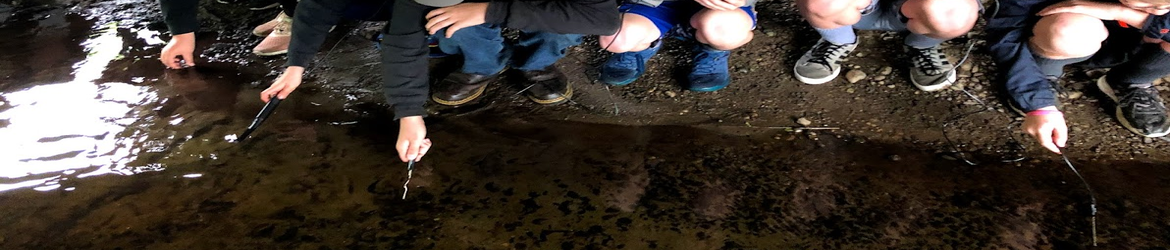
Every year for the past ten years I’ve been taking all my 6th grade classes down to our town creek because it runs right through our school. We test different water quality parameters using probes.
I prepare my students by grouping them by parameter. I take each group and train them on how to use the equipment, especially their parameter probe (for ex. dissolved oxygen). Once all groups are trained we took a practice trip down to the creek. The feedback I give my students includes how well they setup their probe and used it as evidenced by the data they got and how well they cleaned up and put everything away. Some probes require anywhere from no setup to quite a bit of setup. Some probes also require a bit of clean up before putting away. Probes are stored in boxes in specific cubbies and all the boxes are numbered by class and team so that each student is responsible for the same probe everyday and for the entire project.
This year we needed quite a bit of practice. Classes went down a total of nine times and we will see how many got usable data. When I wrote that classes went down nine times, I didn’t mean all three classes. One class in particular was having trouble. That class suffered from what I explained to them as an extreme case of carelessness. After two days of going down to the creek I had them reflect on their execution on the third day instead of going down.
I listed things that needed to be corrected. Among them were taking care of the over $100 probes, not running around with equipment in hand including the $380 Labquest, not leaving probes on the dirt in the poor lit area where they could be stepped on, putting the boxes away in the correct cubby so the next class doesn’t have to waste time finding their equipment, putting the chemicals away in the right place, not leaving things on the ground instead of putting them away, and assorted others. I told the class that any of those could cost our program money we don’t have. They just needed to pay attention and take CARE. While playing around at the creek one student dropped a $380 Labquest probe interface. Since they are water resistant and NOT water proof the machine was completely destroyed meaning we went down from 10 of them to nine of them even though we have 10 groups.
The next day that class went down to the creek many kids repeated their poor choice making that made me worry. I told the class that since it was so many kids making the poor choices and NOT caring, I couldn’t just have a few sit out so I made the tough choice of no longer having that class collect data at the creek. So one class went down three times while the other two went down nine times. The data will be shared on a Google spreadsheet so the class that went down three times is still participating in all the other learning and sharing activities.
It was a tough decision and I made 30 kids unhappy. The worst part is that a number of those 30 didn’t deserve not getting to go to the creek any more because they do care. I stand by my decision, no more equipment was damaged, and we have data to work with. Do I like the decision? No. Would I make a different decision in the future? Well, besides the fact that it depends on the class, I really don’t know.
Guest Post: Science that Sticks
As teachers, we hope to do more than just teach kids information they need to pass tests and score well on end-of-grade exams. We hope to teach information such that the kids remember it five, ten, and even twenty years later. We hope to imbue students with useful facts and figures and to teach critical thinking skills that will help them succeed later in life. It is our collective dream that our students will someday use these facts and skills practically, that perhaps we will be the teachers they mention to their own children, saying, “I learned that in Mr. González’s class.”
But how do we teach in such a manner that the information sticks in their heads, not for a week, but for years? How do we inspire middle school students to stop thinking about the daily dramas of junior high social interactions and actually think about a premise or theory long enough to absorb the lesson? The following are teaching methods that can help us teach science that sticks and English that enlightens (and math that matters… you get the point):
Involve the Senses
We all retain information better when we use our senses—smell, taste, hearing, touch, and sight. Kids are used to using two of their senses when learning – hearing (listening) and sight (reading), but their retention of information goes up when we let them taste, smell or feel while learning.
A study featured on “This Emotional Life” by PBS demonstrated that if you place your hand in a bucket of ice-cold water while reading something, you’ll retain that information better than if you studied without the stimulus of the cold water.
Another study proved that when students speak aloud and listen to their own words, they memorize information more efficiently. That’s why it works to make “ear phones” out of PVC pipe and duct tape so students can speak vocabulary words and listen to themselves through the “ear phones”.
You can help your students by having them draw pictures to help them memorize information. For example, if your child must learn vocabulary words, drawing pictures of the definitions on one side of flash cards may help your student because the visual cues and the kinetic and creative experience of illustrating the cards will help them remember the definitions.
Ask Questions That Matter
We tend to remember information that matters to us. This is an innate skill we all have, tied to our desire to survive. If we consider the information presented to us to be interesting or helpful, we’ll pay extra attention to it. However, if we find the information presented to us to be insignificant, we ignore it, focusing our memory-powers on what we deem to be most important.
This is why it’s essential to find ways to relate learning material to students’ lives and concerns. The more relevant the material to real life concerns, future dreams, creative aspirations, or practical needs, the more likely it is that our students will learn and retain the material.
When helping your student study, ask yourself: Why would this information matter to this child? The answer to that question may make all the difference in how you teach the material and how well the student absorbs it.
With a little extra effort, we can indeed teach in a way that makes the experience more effective and rewarding for us all. After all, teachers are inspired when kids learn, and kids are inspired when teachers teach with enthusiasm and innovation.
About the author:
Amanda Tradwick is a grant researcher and writer for CollegeGrants.org. She has a Bachelor’s degrees from the University of Delaware, and has recently finished research on student grants for women and free federal student grants.
My Fave 11 of 2011
It’s that time of year again. Where people look back and reflect on their top posts. I was reading Pernille Ripp’s top blog post and she made a great point. Instead of listing the posts that got the most hits list the ones that mean the most to you! I love it. And actually I had to do that last year because the ones that got the most hits didn’t include some that really meant a lot to me. So here it goes, my faves of 2011!
[Posts are not in order of preference, that would have been too hard, so I just put them here in chronological order from Jan 2011 to Dec 2011.]
- Awards, Grades, and Competition My compilation of what I’ve been reading and learning about somethings that I’ve never felt comfortable with in education. Now I have the words and background to challenge these traditions.
- What Does Good Teaching Look Like? I set up a Google Doc that is still active with some great ideas for what good teaching should be. It helps me a lot as I refer to it and make sure I’m using as many strategies as I can when they are appropriate.
- We Are the Change We Need An epiphany for me. That all the education reform that we are calling for WE ALREADY ARE! We are doing the work that needs to be done to make education what it needs to be for our children.
- Giving Feedback An idea I used to give students feedback on an assessment without using grades, marks, or percentages of any kind. This year I used that idea without paper! 1:1 baby!
- What is On-Task? A kind of rant and reflection on what I struggle with everyday with students. I want to do what it takes to get my kids motivated to learn but often it’s difficult to figure out what that is without letting kids just play games and goof off.
- Love Learning I was inspired by an activity we did at a faculty meeting and I wrote this blog to share what means most to me in my teaching.
- Applications of Formative Assessment One of my blog posts on the AfL strategies I’ve been learning. It’s a work in progress and the comments were very helpful.
- New Bloggers and Twitterers I wrote this post to share the members of my PLC that have ventured into the world of blogging and Tweeting. In light of all the discussion over the Edublog Awards having people follow and share the work of these people would be so helpful in getting off to a good start and to see the power of the PLN.
- In My Humble Opinion A response blog post to an article in the paper. The article was showing off a school that was using very questionable techniques so I tried to challenge those as not the best way of educating children.
- How Much Socializing Can You Put Up With? I created a Google Form to collect data on how much socializing different educators feel comfortable with in their classes. This is a similar issue to my on task dilemma.
- iPads in Science 2 The follow-up, one year later, post about using iPads in my Science classes. It’s been so awesome!
I’m sorry I just had to have a bonus one. I wrote this blog to show some of my most successful grant proposals to help those interested in writing grants. Sample Grant Proposal
Learning About Cells
This year my Science PLC is focusing on using learning progressions. We’ve worked for years on eliciting evidence so we moved on to a new focus, namely sharing learning expectations. [Disclaimer: I've read some bloggers who raise some great points about sharing learning expectations and using rubrics with our students so I'd like to note here that it depends on what kind of classroom environment you have created for your students. One point is that if we share our learning expectations then we, the teachers, are in charge of the learning and where it goes. An argument against using rubrics is that it limits what students learn and where they take their learning. Personally I find my learning expectations and rubrics very useful for me. I plan on using those after students have chosen where they want to take their learning. I prefer a completely student centered learning environment and in order to make that a reality I have to take my cue from my students. So use the resources here as you see fit, or not.]
There are five of us representing grades 6 – 12 and this year we had an unprecedented bonus. Three of the five of us not only work at the middle school but all three of us are teaching the same 8th grade Science curriculum! We’ve never had a year where any of us taught the same curriculum much less three of us! Since our 8th grade class got a bit overloaded we added a fourth section and hired a new teacher to take that extra fourth class.
This is the learning progression that we were using for a unit on cells. If you can’t see the learning progression click here for a Word Doc copy of it.
The point of the learning progression was to help me determine a sequence to help students learn about cells. The missing pieces that students had from our previous unit was an understanding that all living things are made of cells and the cell is the basic part of all living things. Single celled organisms though are the most basic unit of a living thing while still being able to be considered a living thing following all the characteristics of living things that we all came up with.
I walk a fine line of determining for my students what they are to do next while gauging their readiness and desire to move on or do something different. I don’t get students questioning or branching off in different directions as much as I’d like, which makes it so that I have to choose where we go next. Formative assessments help me because I can choose activities that challenge their misconceptions hoping that they will replace them with actual scientific fact.
Here’s a video of some of the activities we did as part of this unit on cells adapted from the Foss kit Diversity of Life cells investigation.
A great formative assessment probe from one of Paige Keeley’s formative assessment books is the Is it Made of Cells one shown here (students took this assessment early in the progression):

{Alert! This one has not been fully corrected yet so don’t take this copy as having the “right” answers.}
Another great assessment was a question that came right from the kit (this is the question that students were sharing during the whiteboarding activity in the video above):

{Alert! This one is also a work in progress.}
Here’s a video of what my students saw under the microscopes (please excuse my misspelling of the word amoeba!).
We are going to finish this learning progression. Where we go next was determined by two very important factors. One, the WA State standards include Mendelian genetics and one of our teachers is completing a unit with his 8th graders. We talked it over with the high school biology and AP biology teacher and she thought it was a good idea. And two, a few students have shown some interest in genetic traits and what things we inherit from our parents. I’m going with that.


Creative Commons License